Your family’s story, kept at home.

Oakbough Family is a fast desktop app for tracing your family. Everyone you add is saved as a plain, readable text file on your own computer — no database to corrupt, no format to get stuck in. No account, nothing trapped in the cloud.

Windows for now · Linux coming soon

What it does

The files are yours

No hidden database. Your whole family history is plain text files and your own photos in one folder. The app decides WHERE that folder lives — so you never have to make a decision about network drives before you have seen a single person — but it hides nothing: the path is in Settings, the files open whenever you like, and GEDCOM export is always one click away.

Backups that check themselves

You pick one folder for copies — ideally on another drive — and the app does the rest: a copy when you close it, the last ten kept, and every one reopened afterwards to count whether your notes really are inside. A copy is lossless (it never anonymizes or simplifies anything), and restoring creates a SEPARATE archive, so the one you work in is never overwritten.

Bring your tree with you

Already have a tree in Family Tree Maker, RootsMagic, Gramps, Ancestry or MyHeritage? It imports in seconds, sources, dates and places included — and the places become real records with coordinates straight away. A plain spreadsheet of people (CSV) works too. And GEDCOM export is always right there — in the free version as well.

Five ways to see one family

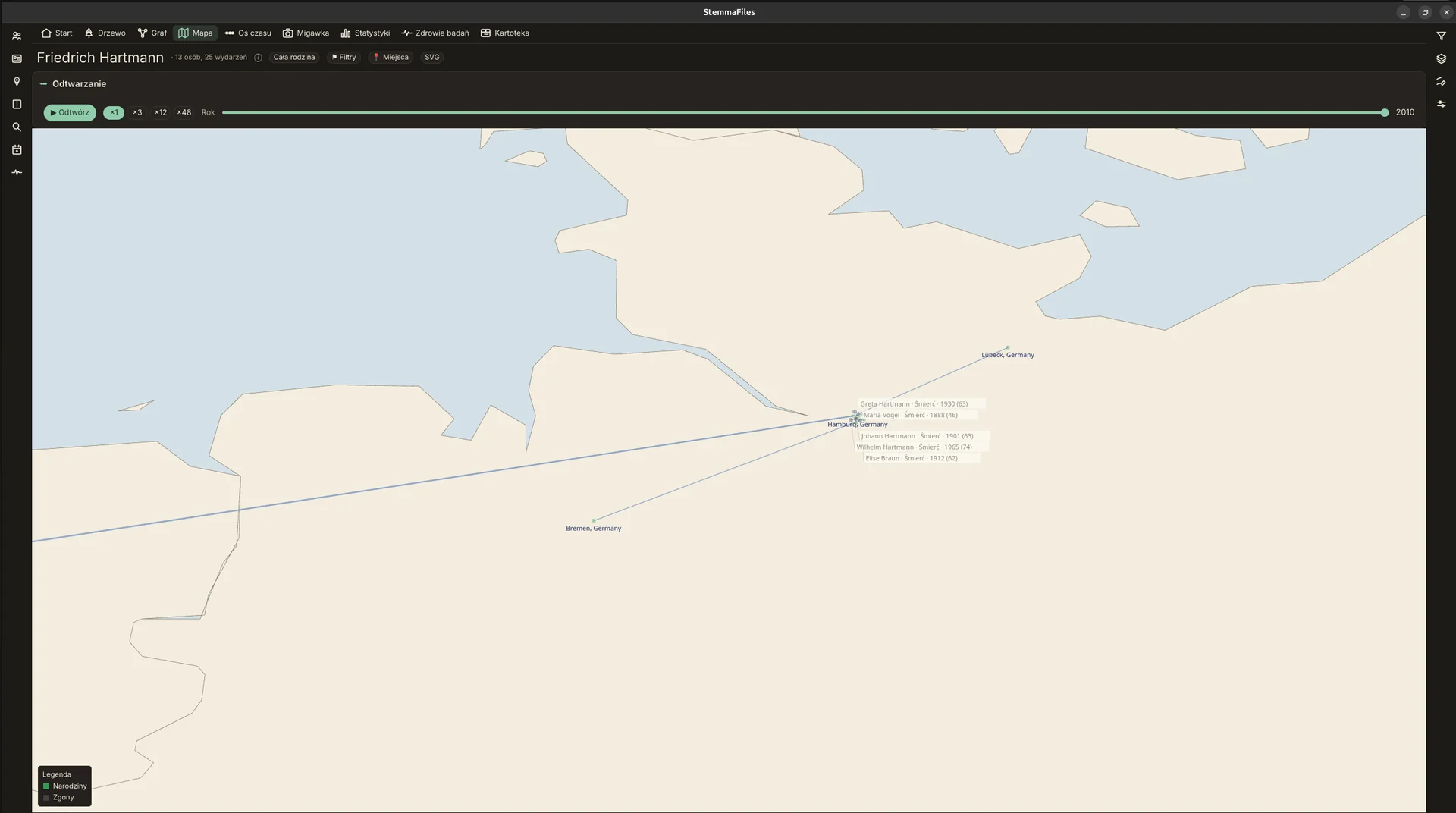
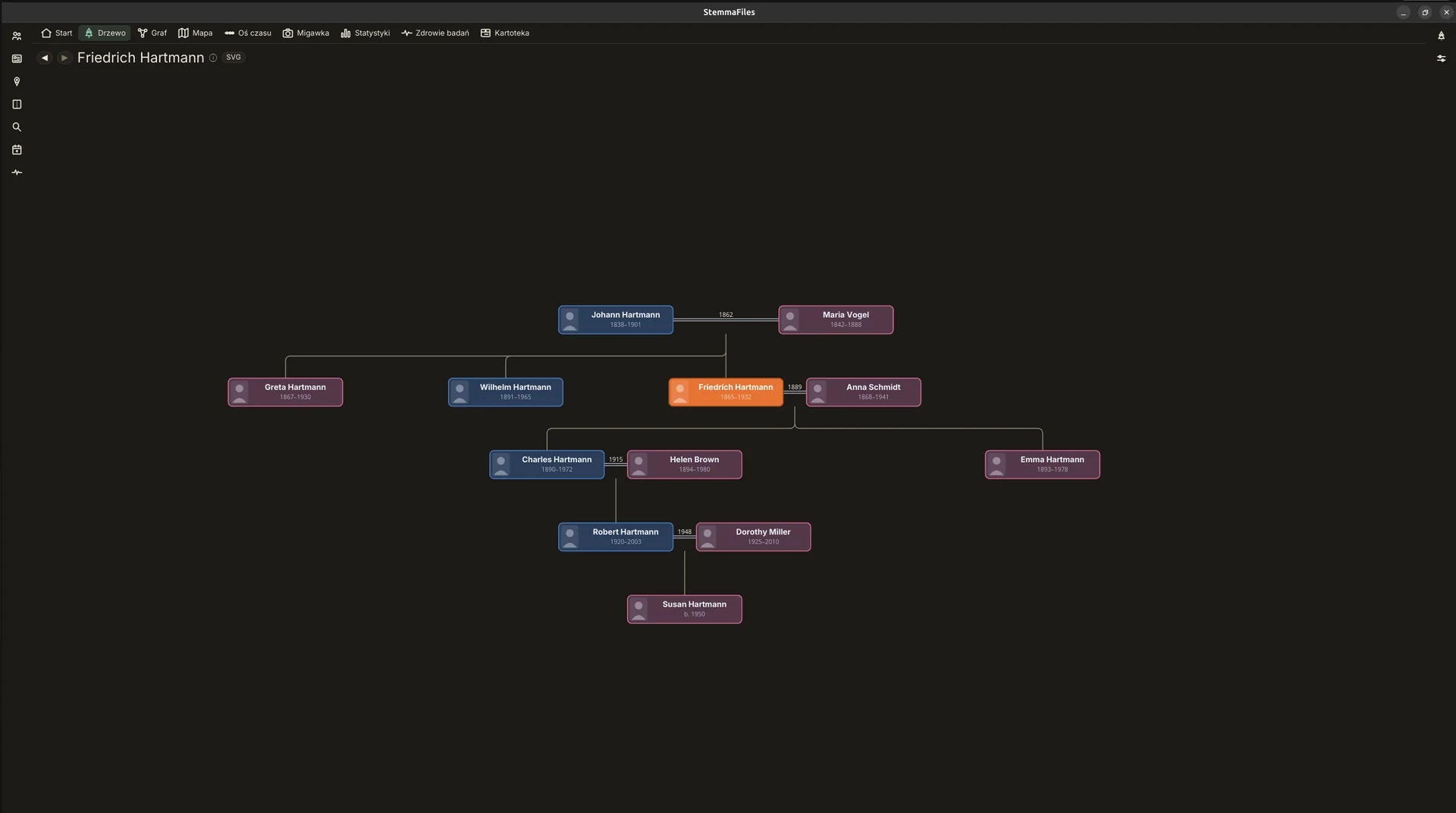
A tree with portraits, a living graph of connections, a map that traces each life, a timeline of generations — and a snapshot of any year: who was alive in, say, 1880, and in which household. All offline, and it doesn't slow down even with tens of thousands of people.

Maps that know their history

Your villages are found without internet. Install the historical border packs and the map changes with the time slider — events from 1790 sit inside the borders of 1790. Two villages with the same name stay two separate places, not one “winner” of the name. Mark the old church, mill or manor yourself, and export any view as a crisp SVG.

Old records' dates, understood

Church books rarely say “21 April 1782”. More often it's “Dominica III post Pascha”. Oakbough Family reads feast-day dates in Latin and Polish, understands double years like “1 Mar 1740/41”, and keeps what the scribe wrote — yet still sorts it and puts it on the map.

Proof, not guesswork PRO

Every fact can carry its source and a confidence level, and the citation comes ready to paste, in Evidence Explained or Chicago style. And the research log remembers where you've already looked — including the searches that found nothing — so next year you don't dig through the same books twice.

Archive Health

A panel of its own reads the whole archive and tells you what doesn't add up: a death before a birth, a child born after a parent's death, a dated fact outside a person's lifetime, likely duplicate people and places, a link that leads nowhere, two notes claiming one identity. It also names the files it could not read, instead of quietly pretending they aren't there.

The Registry — your archive as a table PRO

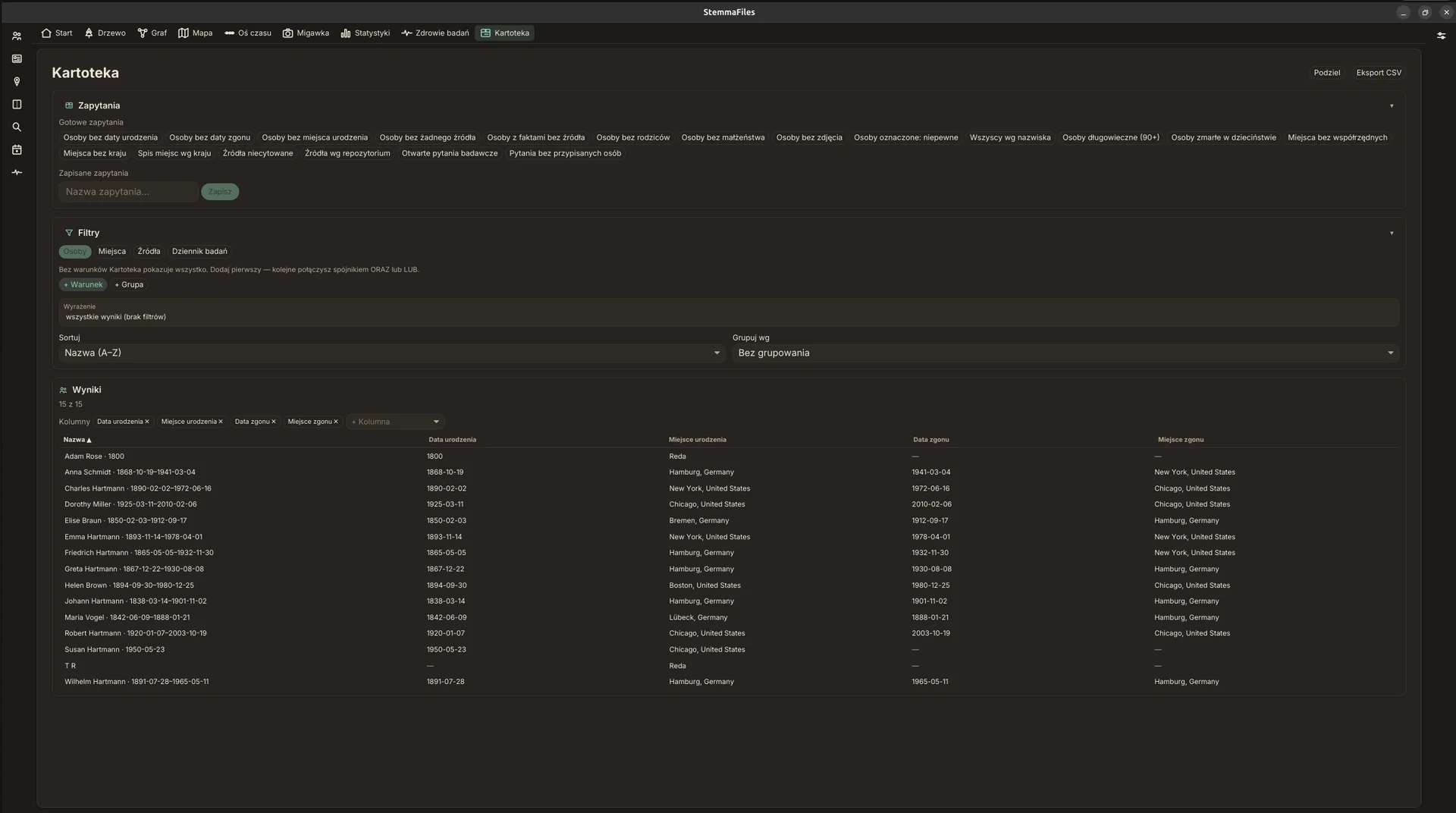
The whole archive in one searchable table: people, places, sources, research questions. Ready-made queries like “people with no birth date”, your own conditions joined with AND and OR, pick-your-own columns, CSV export. For finding the gaps before a trip to the archives, there's no better view.

Godparents, witnesses, and a couple's whole life

The most interesting names in old records are often not family at all. Record who held the child at the font and who witnessed the wedding — they show up on the tree and the graph as real connections, and they survive GEDCOM round-trips. And a couple gets more than a wedding: an engagement, banns, a marriage contract, a separation, a shared census entry, or an event you name yourself.

Photos, scans and faces

Attach portraits and document scans to people and sources. Tag the faces in a group photo and each person gets their own portrait crop from it — it follows them into the tree, their card and the family website.

Print-ready reports PRO

Seven kinds of PDF: a family sheet, ancestor and descendant lists, pedigree and fan charts, a full person profile. Plus a complete family book with its own name index — just the thing for the table at a reunion.

Your tree as a website PRO

One click and your tree becomes a small private website: a clickable chart, a page for every person, your photos, living relatives kept anonymous. Send the family a ZIP — no app or account needed to look.

Private and offline

No telemetry, no account, nothing leaves your computer. People who are probably still living are hidden by default in EVERY export — GEDCOM, PDF reports, the family website, even the tree and map images — so a file you send a cousin doesn't carry your living family with it. Backups are the opposite: always complete, because their job is to rescue, not to publish.

Feels like an heirloom

Warm parchment and ink, a quiet serif for the names that matter, light and dark themes. More family chronicle than spreadsheet. The interface speaks English, Polish, German, French and Spanish.

A look inside

The hourglass family tree in Oakbough Family
The hourglass tree: ancestors above the chosen person, descendants below. Click anyone to open their card
A family’s life journeys drawn on the map
A whole family's life journeys on the map. Press Play and watch the story move year by year
The home screen in the dark theme
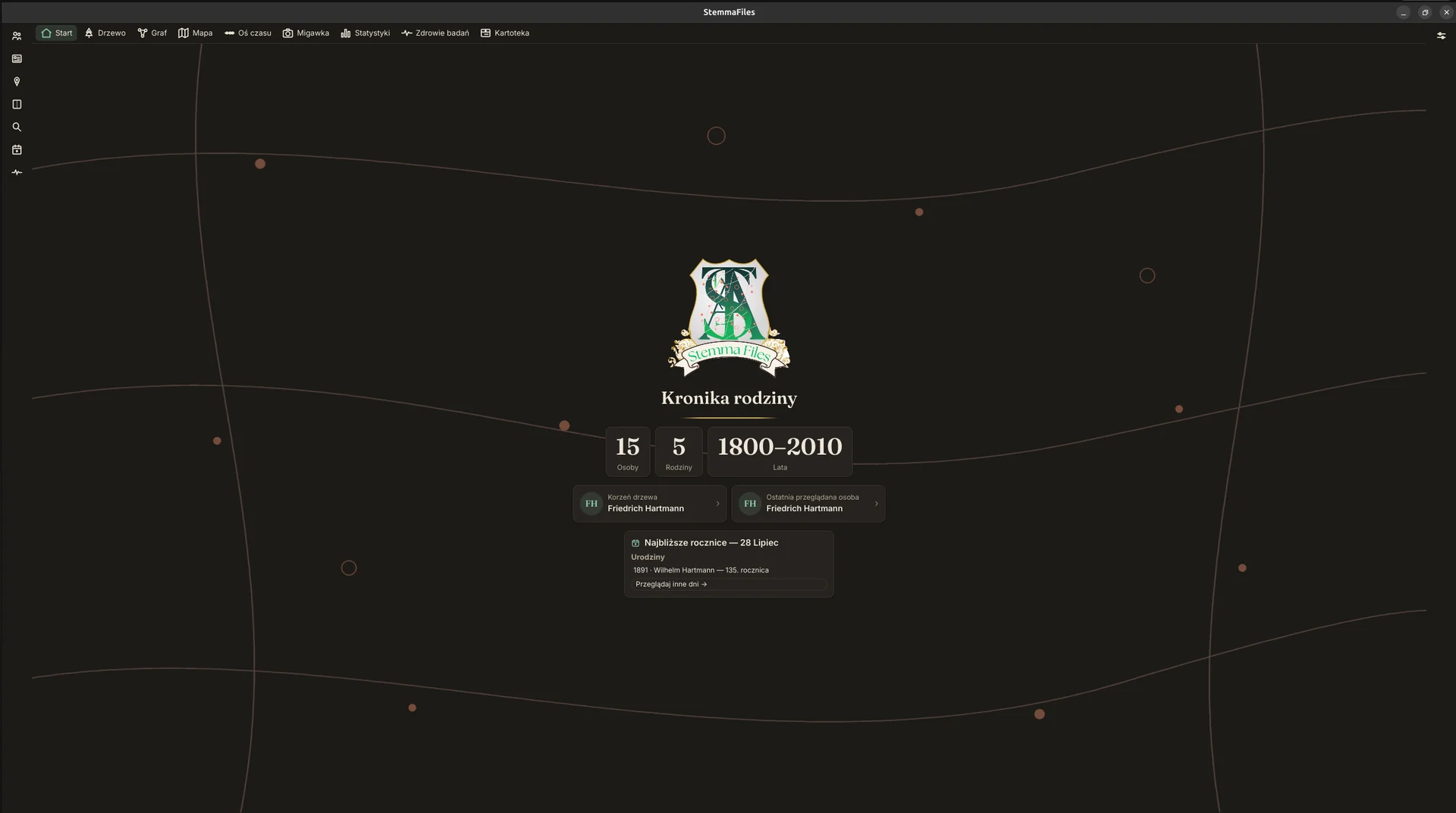
The home screen — a few numbers about your archive, where you left off, and the nearest anniversaries. Here, the Jagiellonian dynasty in the dark theme
The Registry: the archive as a filtered table
The Registry: your whole archive in one searchable table — ready-made queries, your own filters and columns, CSV export

No database. Just files.

We don't ask you where to put a folder — you give your archive a NAME, the app creates it and shows you the full path in Settings. Inside there is nothing mysterious: every person is one Markdown note, the key facts up top, your own story below, family ties as simple links. Filenames are stable ids — I1.md — so a changed surname never breaks a link — the name itself is in the note's first lines. Open one in any text editor, today or in thirty years.

Kowalski/                       ← the archive you named
├── Persons/   I1.md            ← one note per person
├── Places/    L1.md            ← places with their coordinates
├── Sources/   S1.md            ← the records your facts come from
├── Research/  Q1.md            ← open questions & what you've tried
├── Media/     jan-portrait.jpg ← photos and document scans
└── vocab.toml                  ← your own kinds of events

How it works

  1. Download and import

    Install the app and bring in your tree from a GEDCOM file — or start fresh with the first person.

  2. Try PRO free for 30 days

    Every PRO feature, unlocked: start the trial in Settings → License and about. No card, no account.

  3. Free forever, or PRO once

    Keep the free version for as long as you like, or buy PRO once — the key appears on screen and arrives by e-mail.

Download

Oakbough Family is in early access: the app works and is in daily use, and new versions arrive often (the app tells you when). The Windows installer needs no administrator rights and installs for your account only.

Windows 10 or 11, 64-bit · 23 MB · no administrator rights

On first run Windows will show a SmartScreen prompt — it is not a virus warning. Click “More info” → “Run anyway”; the questions below explain why it appears.

Pricing

The core app is free forever — no person limits, nothing expires. The researcher's workbench (PRO) unlocks with one payment, once, for good: no subscription, no account. And your files are plain text either way — everything you've written stays readable, whichever you choose.

Free

$0 forever

An unlimited tree and editing, the living graph, the world map with life journeys and a time slider, the timeline, any-year snapshots, statistics, Archive Health (contradictions, duplicates, unreadable files), backups, and GEDCOM import and export. Never expires, never takes anything away.

Free and PRO, side by side
What you getFreePRO
Your family, free forever
Unlimited people and full editing — nothing ever expiresincludedincluded
The tree, the living graph, the timeline, any-year snapshots, statisticsincludedincluded
The world map with life journeys and Life Storyincludedincluded
GEDCOM import and export, CSV importincludedincluded
Archive Health: contradictions, duplicates, unreadable filesincludedincluded
Photos, face tags, godparents and witnessesincludedincluded
Self-checking backups; living people hidden in every exportincludedincluded
The researcher's workbench
Adding and editing sources and citations (browsing them stays free)not includedincluded
Ready-to-paste citations (Evidence Explained, Chicago)not includedincluded
The research log and Research Healthnot includedincluded
The Registry — query the whole archive, export to CSVnot includedincluded
PDF reports and the family booknot includedincluded
Your tree as a family websitenot includedincluded
Historical border maps and former place namesnot includedincluded

Try every PRO feature free for 30 days in the app.

Purchases are handled by Paddle, our merchant of record, in your local currency. Prices include VAT or sales tax where it applies; Paddle shows the final price at checkout. Your license key appears the moment you pay, on the confirmation page, and by e-mail to the address you bought with. PRO is sold at the early-access price until version 1.0 is released — then $59.99 (€49.99, £44.99, 199.99 zł).

Questions

Is my data locked in?

No — that's the whole point. Your family history lives as plain, readable Markdown files, with a standard GEDCOM export on top that any other genealogy program will read. If Oakbough Family vanished tomorrow, you'd still have everything.

Where do my files actually live?

In a folder the app creates under its own data directory — we don't ask you at the start, because “pick a folder” is a decision nobody can make well before they've seen the program. You give the archive a name (“Kowalski”), and the full path is in Settings for you to do whatever you like with. The only folder question you'll hear is where to keep your backups.

What if I delete something, or the computer dies?

The app copies your archive when you close it (into the folder you chose), keeps the last ten and verifies each one after making it. Restoring a copy creates a separate archive, so it never overwrites the one you work in. On top of that, anything that could overwrite — a replacing import, a mass rename — asks first and moves the old notes into a dated backup folder. And if you have git installed, you also get the History panel with a snapshot after every save.

Does it work offline? Is there any tracking?

Fully offline — the world map and place index are built in. Looking places up online is strictly opt-in. The app sends no telemetry. This website sets no cookies of its own and runs no analytics; only this page, for its pricing, loads Paddle's checkout script — to show the price in your currency and to take payments — which may store technical data needed for payment and fraud prevention, under Paddle's privacy policy.

How big a tree can it handle?

Comfortably into the tens of thousands. The import pipeline, the map and the Registry are exercised on generated 20,000–30,000-person trees in the test suite, and the views stay responsive — the map simply clusters pins until you zoom in, and “show me everyone at once” views offer a narrower scope instead of choking.

What does it cost?

The core app is free forever — no person limits, no trial clock, nothing expires: the tree, editing, the graph, the map with life journeys, the timeline, Archive Health, backups, and GEDCOM both ways. The researcher's workbench (sources and citations, the research log, the query workbench, PDF reports, the family website, historical maps) is the PRO pack: a single purchase — $29.99, the early-access price until version 1.0 is released, then $59.99 — no subscription of any kind. The license is perpetual for the whole 1.x line, covers up to 3 of your computers, and you can try PRO free for 30 days inside the app first. A future 2.0 — years away — will be a separate, optional upgrade with a discount for 1.x owners; your 1.x keeps working indefinitely.

What happens when the trial ends?

The PRO tools become read-only: everything you made with them stays and opens as before, nothing is deleted, and the app never locks you out. Everything in the free version keeps working, and your files stay plain text on your own disk.

Can I get a refund?

Yes — within 14 days of the purchase, no questions asked. Write to contact@oakbough.com from the address you bought with, or reply to your Paddle receipt. After the refund the key is deactivated automatically. Refund policy

I lost my license key

It's in the e-mail you got right after the purchase, sent to the address you bought with. Can't find it? Write to contact@oakbough.com from that address and you'll get the key again.

New computer?

Install the app and enter the same key — no new purchase. One license works on up to 3 of your computers; if all three are taken and you want to move one, write to contact@oakbough.com and the slot is freed.

Windows says it protected my PC — why?

It is not a virus warning — SmartScreen is saying “I don't know this file”. It trusts programs based on how many people have downloaded them and whether the publisher holds a certificate; a new program from a one-person author has neither yet. Click “More info” → “Run anyway”. Oakbough Family installs for your account only, never asks for administrator rights, and sends nothing to the internet. We will buy a publisher certificate once the program has enough downloads for it to mean something — bought today it would not remove this screen a day sooner.

Which platforms are supported?

Windows for now. Linux is coming soon — tell us you want it at contact@oakbough.com. When a Linux or macOS version ships, the same license covers it.